

Plans, prices and conversation limits
Click2Reply has four plans. Prices are in US dollars, per seat (each active human agent) per month. Bots never take a seat. You can compare and change plans in Billing.
Billing -> Plans
The plans
Section titled “The plans”| Free | Pro | Business | Enterprise | |
|---|---|---|---|---|
| Price, billed monthly | $0 | $19 per seat / month | $35 per seat / month | Contact us |
| Price, billed yearly | - | $15 per seat / month | $29 per seat / month | Contact us |
| Agent seats | 2 | Unlimited | Unlimited | Custom |
| Conversations a month | 250 | Unlimited human chats | Unlimited human chats | Custom |
| Automated conversations included a month | Counted in the 250 | 2,000 | 10,000 | Custom |
| Extra automated conversations | - | $5 per 1,000 | $5 per 1,000 | Custom |
| Chat history shown | Last 60 days | All | All | All |
| Transcript emails | 50 a month, then transcript links | Unlimited | Unlimited | Unlimited |
| Single sign-on, required two-factor, IP allowlist | - | - | Yes | Yes |
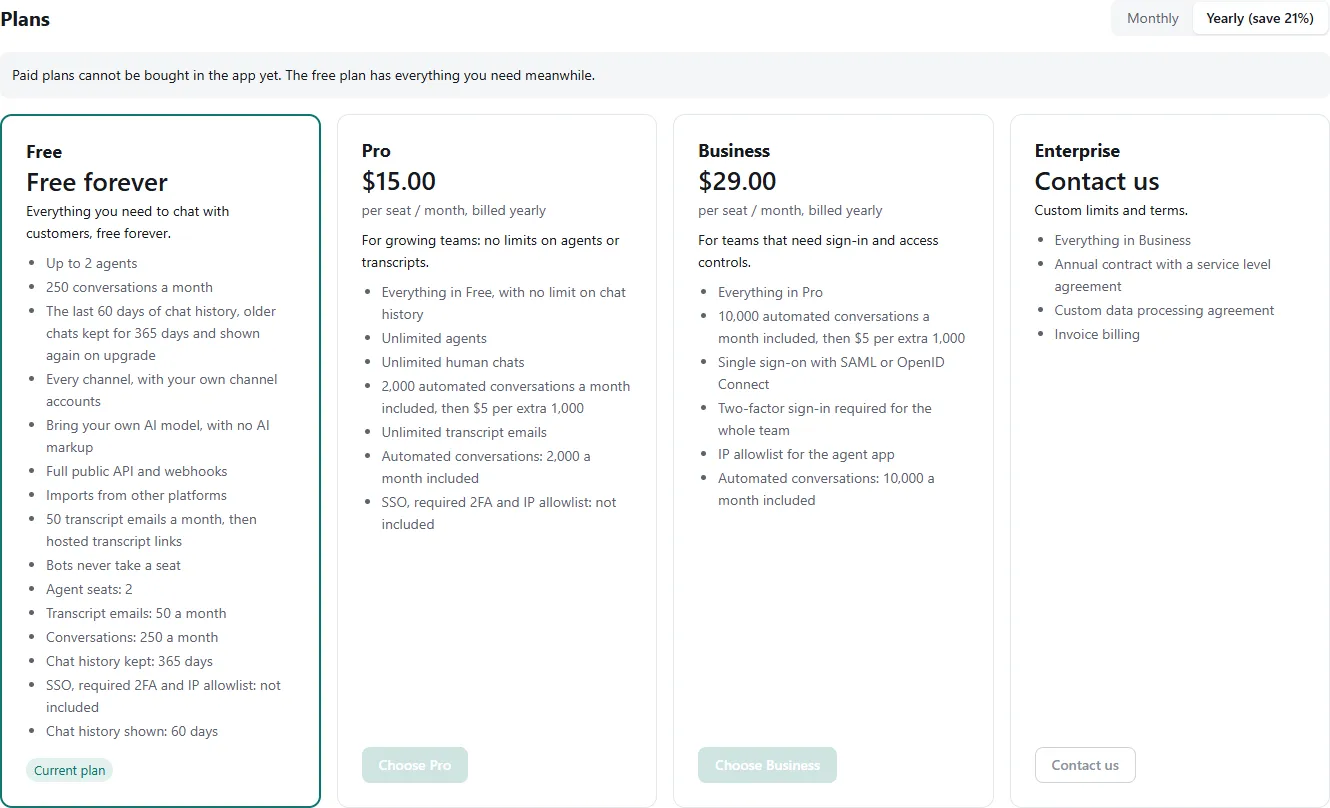
“Everything you need to chat with customers, free forever.”
- Up to 2 agents
- 250 conversations a month
- The last 60 days of chat history, older chats kept for 365 days and shown again on upgrade
- Every channel, with your own channel accounts
- Bring your own AI model, with no AI markup
- Full public API and webhooks
- Imports from other platforms
- 50 transcript emails a month, then hosted transcript links
- Bots never take a seat
“For growing teams: no limits on agents or transcripts.” $19 per seat a month, or $15 billed yearly.
- Everything in Free, with no limit on chat history
- Unlimited agents
- Unlimited human chats
- 2,000 automated conversations a month included, then $5 per extra 1,000
- Unlimited transcript emails
Single sign-on, required two-factor and the IP allowlist are not included.
Business
Section titled “Business”“For teams that need sign-in and access controls.” $35 per seat a month, or $29 billed yearly.
- Everything in Pro
- 10,000 automated conversations a month included, then $5 per extra 1,000
- Single sign-on with SAML or OpenID Connect
- Two-factor sign-in required for the whole team
- IP allowlist for the agent app
Enterprise
Section titled “Enterprise”“Custom limits and terms.” Priced on request: use Contact us on the plan.
- Everything in Business
- Annual contract with a service level agreement
- Custom data processing agreement
- Invoice billing
How conversations are counted
Section titled “How conversations are counted”A conversation is one chat with a customer, on any channel. It is counted once, in the month it starts. Months are calendar months in UTC, and every count starts again on the first day of the month.
On Free, every conversation counts toward the 250, whether a person or a bot answers it. When you reach 250, new chats are turned away until the first day of next month, and customers who try to start one see “Our agents are not available at the moment.” Chats already going on carry on. See When you reach the monthly conversation cap.
On paid plans, chats a person answers are unlimited. Only automated conversations are metered: those a chatbot, an API token or a workflow answered and no person did. Past your plan’s included amount, packs of 1,000 more are bought automatically for $5 each and added to your bill. Automated conversations never stop at the allowance. Billing shows how many packs you have used this month.
The billing contact gets an email when a monthly meter reaches 80% of its limit, and again at 100%.
Other limits
Section titled “Other limits”- Seats: on Free, at most 2 active agents. Inviting is not blocked, but accepting an invite, approving a join request or reactivating an agent is refused when no seat is free. Suspended agents, open invites and bots do not take a seat. To move to a plan with fewer seats than you use, suspend agents first.
- Chat history on Free: chats older than 60 days are hidden, not deleted, and come back when you upgrade. Chats older than 365 days are deleted; the owner gets an email 30 days before the first deletion. A shorter limit of your own deletes sooner; see Data and privacy.
- Transcript emails on Free: after 50 in a month, customers get a link to the transcript instead of an email, until the next month.
- Single sign-on, required two-factor and the IP allowlist: these can be turned on only on Business and Enterprise. See Single sign-on and Login settings.