

Availability: what customers see offline
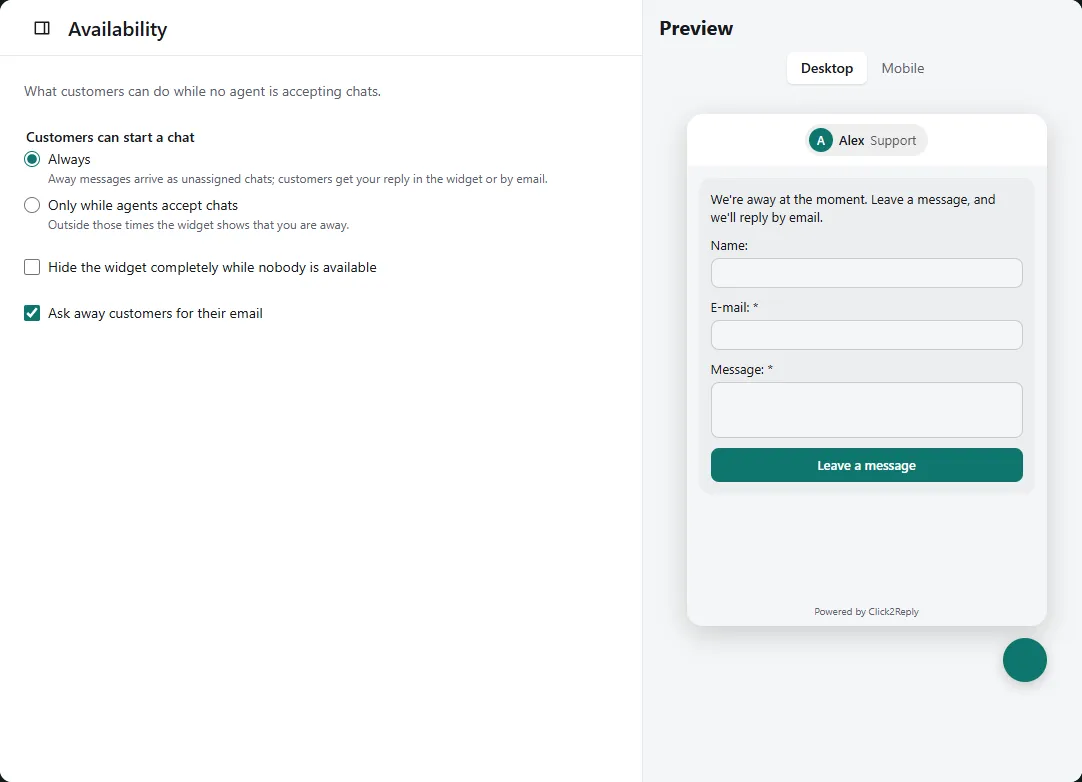
Decide what customers can do while no agent is accepting chats. The Preview shows the widget as away customers see it.
Settings -> Chat widget -> Availability
Changing these settings needs the permission to change settings (the Owner, Vice owner and Admin roles). Availability applies to the whole organization; it has no per-group setup.
Choose whether customers can start a chat
Section titled “Choose whether customers can start a chat”Under Customers can start a chat, pick one:
- Always - customers can still write while you are away. Their messages arrive as unassigned chats, and they get your reply in the widget or by email.
- Only while agents accept chats - outside those times the widget shows that you are away.
Then click Save changes.
Agents accept chats with the Accepting chats switch in their profile menu. Outside your working hours the widget also shows that you are away, and these rules apply.
Hide the widget while nobody is available
Section titled “Hide the widget while nobody is available”- Tick Hide the widget completely while nobody is available.
- Click Save changes.
While nobody is available the widget then does not show on your site, except to a customer who is already in a chat.
Ask away customers for their email
Section titled “Ask away customers for their email”- Tick Ask away customers for their email, so customers who write while you are away are asked for an address your reply can reach.
- Click Save changes.
This is the same option as Ask for an email right away on the Ask for email page; changing it on one page changes it on the other.