

Data privacy, GDPR and data retention
Click2Reply gives you two tools for privacy rules such as the GDPR: a customer’s own data can be exported or erased from their profile, and the Data and privacy page sets how long data is kept and your privacy details.
Settings -> Company -> Data and privacy
Owners, vice owners and admins can change this page and export or erase a customer’s data. A custom role can be given the same right.
Export a customer’s data
Section titled “Export a customer’s data”When a customer asks for a copy of what you hold about them:
-
Open the customer on the Customers page.
-
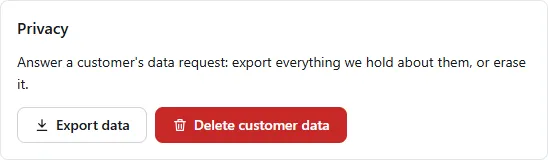
In the Privacy card, click Export data. The button shows it is working while the export runs.
-
When it is ready, click Download export.
The file is a compressed JSON file named after the customer’s ID, customer-<id>.json.gz. If the export fails, the card says The export failed. Try again.
Erase a customer’s data
Section titled “Erase a customer’s data”When a customer asks you to delete their data:
- Open the customer on the Customers page.
- In the Privacy card, click Delete customer data.
- In Type phrase to confirm, type what the dialog asks for: the customer’s name, or their email when they have no name, or their ID when they have neither.
- Click Delete for good.
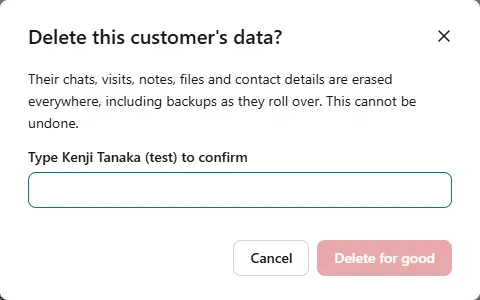
Their chats, visits, notes, files and contact details are erased everywhere, including backups as they roll over. This cannot be undone. The app says The customer’s data is being erased. and takes you back to the customer list while it runs.
Set how long data is kept
Section titled “Set how long data is kept”Under Keep data for, enter a number of days, from 1 to 3650, for each kind of data:
- Chats and transcripts
- Visited pages
- Shared files
Leave a field empty to set no limit of your own for that data. Click Save changes.
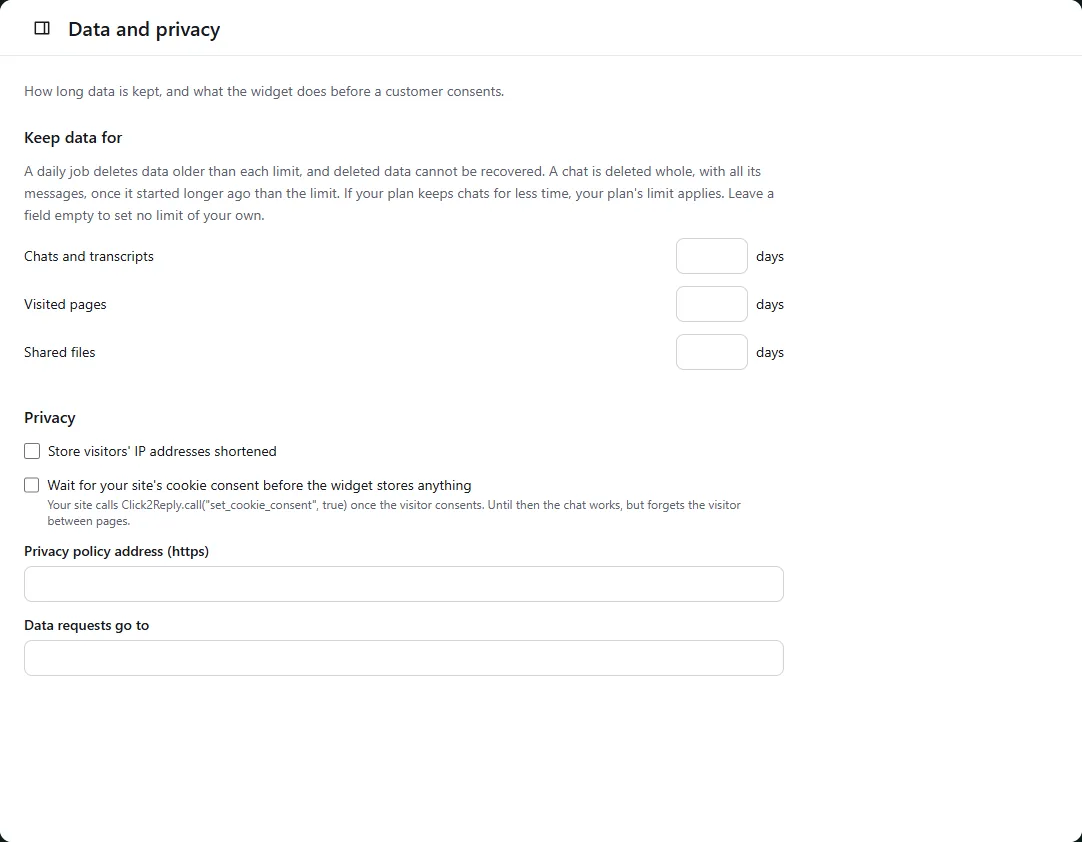
Once a day, Click2Reply deletes the data older than each limit you set. Nobody is emailed first, and deleted data cannot be recovered. A chat is deleted whole, with all its messages, once it started longer ago than the limit, even if it is still going on. Shared files are deleted at their own limit while their chats stay, and never outlive their chats. While an import is running, nothing is deleted by these limits.
Your plan also sets how long chats are kept, and the shorter of the two applies. When the plan’s period applies to your organization, the owner is emailed before anything is deleted by it. See Plans.
Set your privacy details
Section titled “Set your privacy details”Under Privacy:
- Tick Store visitors’ IP addresses shortened to keep only part of each visitor’s IP address.
- Tick Wait for your site’s cookie consent before the widget stores anything if your site asks visitors for cookie consent. Your site then calls
Click2Reply.call("set_cookie_consent", true)on each page once the visitor consents; until then the chat works, but forgets the visitor between pages. See the Widget API. - In Privacy policy address (https), enter the address of your privacy policy. It must start with
https://. The privacy notice links to it when the notice has no address of its own. - In Data requests go to, enter the email address that handles customers’ data requests. Changing it takes the right to export customer data, since this address gets each export’s download link.
- Click Save changes.
Turning on shortened IP addresses also removes the full addresses and map positions already stored on your customers, and shortens the addresses of visitors in Traffic. Chats keep the address they recorded, including chats started later from a widget that was already open when you turned it on.
Emails about data requests
Section titled “Emails about data requests”Each export or erasure is emailed to the Data requests go to address, or to the owner when it is empty: once when work on it starts, once when it is done, and once if it fails after several tries.
- A finished export’s email has a link that downloads the file for 72 hours, with no sign-in, from a network on your network allow list when you have one. After that, download it from the customer’s profile.
- A finished erasure’s email lists how much of each kind of data was removed. Neither email contains the customer’s data.
Use the API
Section titled “Use the API”Exports and erasure requests can also be made through the API with a token that has the data.export scope. See the developer quickstart and API and webhooks for tokens.
Related
Section titled “Related”- Customers
- Privacy notice
- Card number masking
- Company details - delete the whole organization