

Privacy notice above the chat widget
Show customers a short notice above the chat, with a link to your privacy policy. The Preview shows the notice as you write it.
Settings -> Chat widget -> Privacy notice
Changing these settings needs the permission to change settings (the Owner, Vice owner and Admin roles). With two or more groups, pick one under Setup for to give that group’s widget its own notice (see Settings).
Show a privacy notice
Section titled “Show a privacy notice”- Switch Show a privacy notice on.
- Write the Notice text, up to 1,000 characters.
- Optionally, paste your policy’s address in Privacy policy address (https).
- Click Save changes.
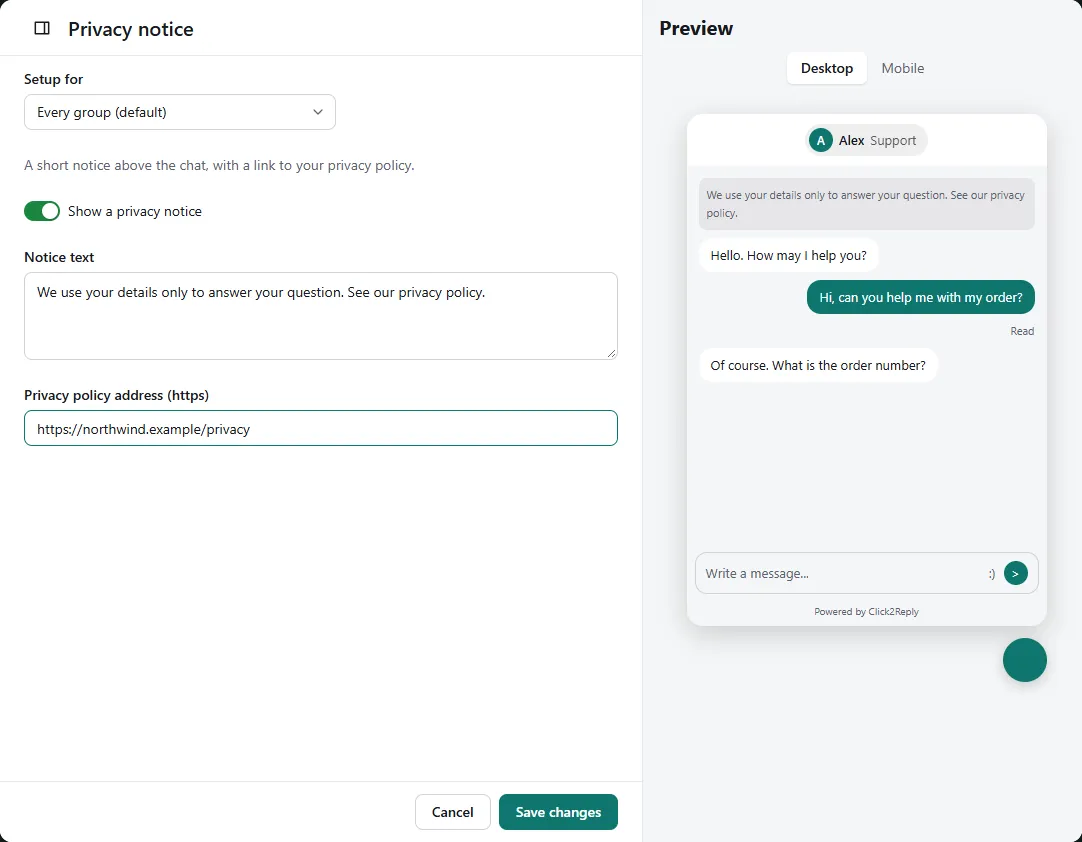
A notice that is on needs text: with an empty Notice text the page shows
Write the notice, or switch it off and cannot be saved. The policy address must start with
https://. Left empty, the notice links to the privacy policy address set in
Data and privacy, if there is one.
To stop showing the notice, switch Show a privacy notice off and click Save changes.
Related
Section titled “Related”- Data and privacy
- Pre-chat form - add a Consent element when customers must agree before chatting
- Welcome screen