

Customer reports: queues and visitors
The customer reports show the people on the other side: who waited in the queue, who left it, and how many visitors your website has. Each one uses the period, filters and exports described in Reports.
Reports -> Customers
Customers wait in the queue when every agent who could take their chat is at their chat limit. See Chat assignment.
Queued customers
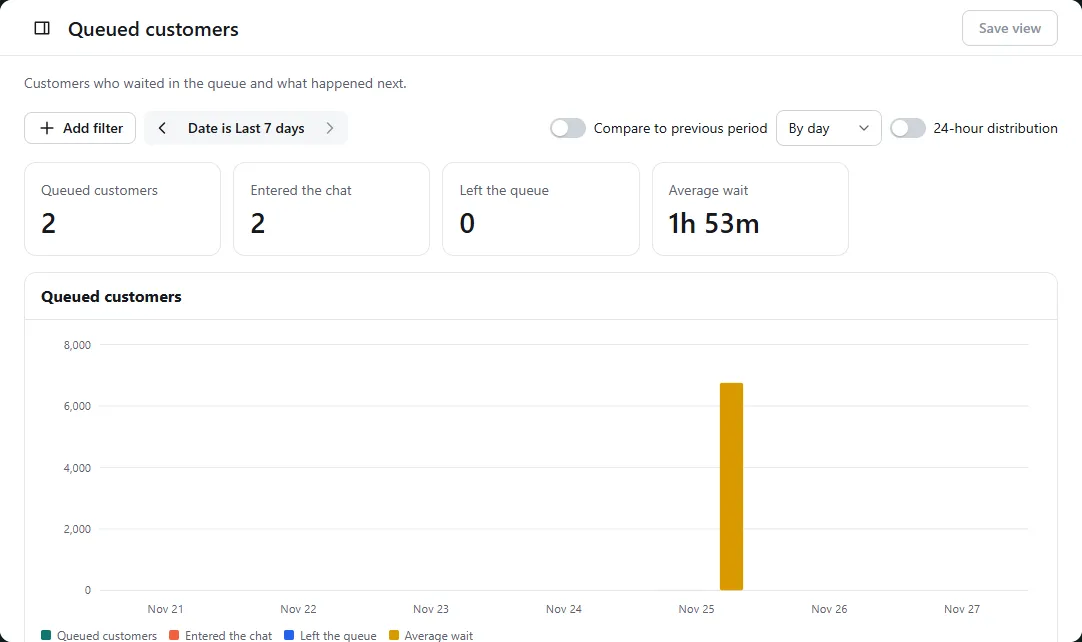
Section titled “Queued customers”Customers who waited in the queue and what happened next:
- Queued customers: customers who entered the queue.
- Entered the chat: those who got an agent.
- Left the queue: those who left before a chat started.
- Average wait: how long the ones who got an agent waited.
A long wait or many people leaving means you need more agents, or higher chat limits, at those times.
Queue abandonment
Section titled “Queue abandonment”Customers who left the queue before a chat started. The tiles show how many Left the queue and their average Wait before leaving. The list has one row per customer, newest first, with the Chat, when they were Queued, when they Left, their Wait and the Group they waited for. The list comes in pages of 25.
Use it to see how long customers are willing to wait, and which groups lose them.
Unique visitors
Section titled “Unique visitors”Visitors and page views on your website, with the chat widget installed. The tiles show Visitors, Page views, Chats, and Chat conversion: chats as a share of visitors. See Traffic for the visitors on your website right now.