

Chat page: a hosted link for your chat
The chat page is a full-page chat hosted by Click2Reply. Share its link in emails, social posts, QR codes and signatures, and customers can chat with you without a website.
Settings -> Channels -> Chat page
Changing the page needs the permission to change settings (the Owner, Vice owner and Admin roles). Every agent can copy and open the link.
Share the link
Section titled “Share the link”- At the top of the page, click Copy link to copy the page’s address. You see Link copied.
- Or click Open chat page to open it in a new tab and send yourself a test message. The chat arrives in Chats like any other.
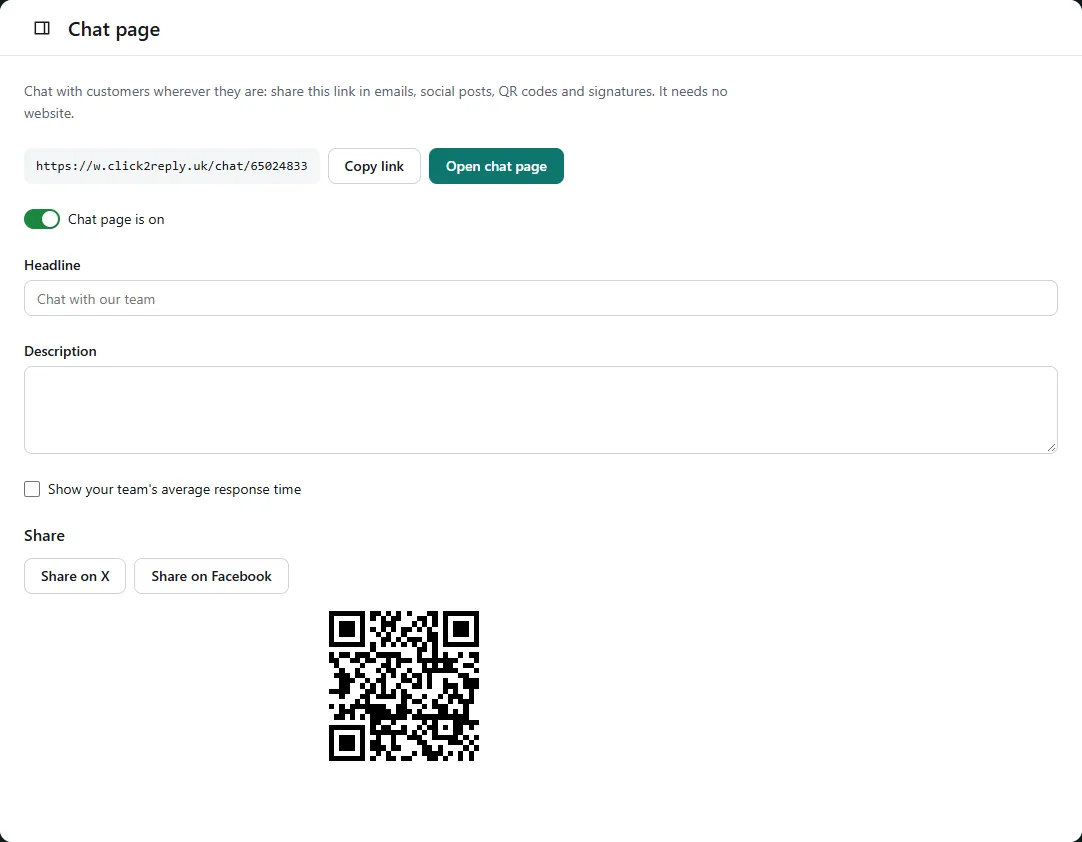
Under Share you can also:
- click Share on X or Share on Facebook to post the link with a short Questions? Chat with us: line,
- save or scan the QR code to print it or put it in a slide.
If your organization has more than one group, pick a group under Setup for first. The link then carries that group, and chats from it go to that group.
Turn the page on or off
Section titled “Turn the page on or off”- Switch Chat page is on on or off.
- Click Save changes.
While the page is off, anyone opening the link sees This chat is not available.
Change the headline and description
Section titled “Change the headline and description”- Type a Headline. Leave it empty to show Hello.
- Type a Description. Leave it empty to show the default welcome text.
- Click Save changes.
The headline can be up to 120 characters and the description up to 1,000.